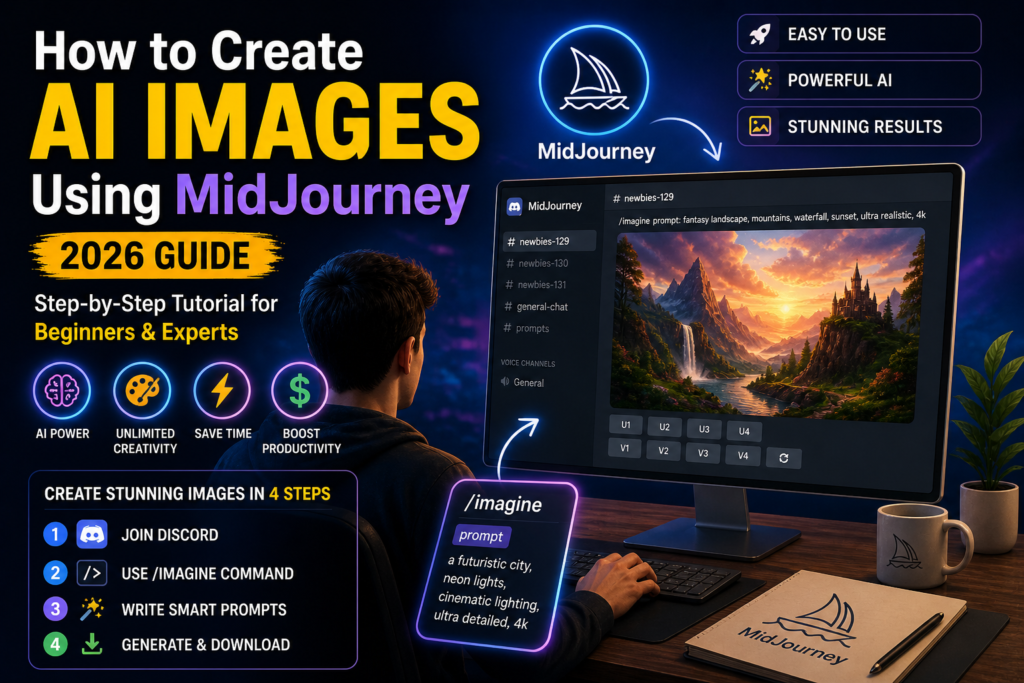
How to Create AI Images Using MidJourney (2026 Guide): Introduction to AI Image Generation
Artificial Intelligence has revolutionized the creative industry, and tools like MidJourney are leading this transformation. This How to Create AI Images Using MidJourney (2026 Guide) will help you understand everything—from basic setup to advanced prompt engineering—so you can create professional-quality images effortlessly.
In 2026, AI-generated images are widely used across industries such as blogging, YouTube, digital marketing, advertising, and even branding. The biggest advantage is that you don’t need years of design experience. With just the right prompt, you can generate stunning visuals in seconds.
🚀 What is MidJourney & Why It’s Powerful
MidJourney is an AI-based image generation tool that converts text descriptions into high-quality images. Unlike traditional software like Photoshop, MidJourney focuses on creativity and automation.
Key Benefits:
- No design skills required
- Fast image generation
- Unlimited creative possibilities
- High-quality artistic outputs
What makes MidJourney special is its ability to understand artistic styles, lighting, textures, and composition from simple text prompts.
⚙️ How MidJourney Works (Simple Explanation)
MidJourney works through a Discord-based system where users interact with an AI bot.
Basic Workflow:
- You type a prompt
- AI processes your input
- It generates 4 image variations
- You select, upscale, or refine
The AI uses deep learning models trained on massive datasets to produce realistic and artistic visuals.
🛠️ Step-by-Step Setup Guide
Step 1: Create a Discord Account
Go to Discord’s official website and sign up.
Step 2: Join MidJourney Server
Join the MidJourney Discord server and access beginner channels.
Step 3: Choose a Subscription Plan
MidJourney offers paid plans for better speed and features.
📝 How to Create AI Images Using MidJourney (Step-by-Step Guide)
Step 1: Use the /imagine Command
Type:
/imagine prompt: futuristic city, neon lights, ultra realistic, 4kStep 2: Write a Detailed Prompt
The more detailed your prompt, the better the result.
Step 3: Generate and Select Images
MidJourney generates 4 variations:
- U1–U4 → Upscale
- V1–V4 → Variations
Step 4: Download Final Image
Once satisfied, download the high-quality image.
🧠 Deep Dive into Prompt Engineering
Prompt engineering is the most important skill in MidJourney.
📌 Ideal Prompt Structure
Subject + Style + Details + Lighting + Quality
Example Prompt:
“Portrait of a cyberpunk warrior, neon lighting, cinematic style, ultra HD, sharp focus”
🎨 Important Keywords to Use
To improve your images, include:
- Realistic / Photorealistic
- 3D Render
- Cinematic
- Ultra HD
- Detailed
💡 Lighting, Camera & Mood Techniques
Adding these elements dramatically improves quality:
- Golden hour lighting
- Studio lighting
- Wide-angle lens
- Depth of field
- Dramatic shadows
📐 MidJourney Parameters Explained
Aspect Ratio
--ar 1:1(Instagram)--ar 16:9(YouTube thumbnails)
Quality
--q 2gives higher detail
Stylize
--stylize 1000makes images more artistic
Chaos
--chaos 50creates more random results
⚡ Advanced Techniques for Better Results
🔍 Upscaling
Enhances image resolution and sharpness.
🔁 Variations
Generate different styles from one prompt.
🎛️ Remix Mode
Edit prompts while creating variations.
🧩 Multi-Prompting
Combine multiple ideas:
“forest + cyberpunk city + neon lights”
🖼️ Example AI Image Outputs

⚠️ Common Mistakes to Avoid
- Using vague prompts
- Not adding styles or lighting
- Ignoring parameters
- Expecting perfect results instantly
💡 Pro Tips to Create High-Quality AI Images
- Be specific and descriptive
- Use multiple prompt variations
- Study trending styles
- Practice consistently
💰 How to Monetize AI Images
You can earn money by:
- Selling AI art
- Creating thumbnails for YouTubers
- Freelancing
- Print-on-demand products
🔮 Future of AI Image Generation
AI image tools will continue to evolve with:
- More realistic visuals
- Faster generation speed
- Better customization options
MidJourney is expected to become even more powerful in the coming years.
❓ FAQs
1. Is MidJourney easy for beginners?
Yes, it’s beginner-friendly with practice.
2. Do I need coding skills?
No coding is required.
3. Can I create realistic images?
Yes, ultra-realistic images are possible.
4. Is MidJourney free?
Limited free access is available.
5. What makes a good prompt?
Detailed and descriptive prompts.
6. Can I sell AI images?
Yes, depending on usage rights.
7. How fast are results?
Usually within a minute.
8. What is stylize?
Controls artistic intensity.
9. Can I use it on mobile?
Yes via Discord.
10. What is remix mode?
Edit prompts during variation.
11. How to improve quality?
Use upscale and better prompts.
12. Can I create logos?
Yes, but may need editing.
13. What is chaos parameter?
Adds randomness.
14. Best use case?
Content and marketing.
15. How to master MidJourney?
Practice daily and experiment.
🏁 Conclusion
Mastering How to Create AI Images Using MidJourney (2026 Guide) is a valuable skill in today’s digital world. With the right prompts, techniques, and consistency, you can create stunning visuals that look professional and unique.
Start simple, experiment often, and gradually learn advanced features. Over time, you’ll not only improve your creativity but also unlock opportunities to earn from AI-generated content.