WhatsApp Tricks (2026 Guide): You’re Using WhatsApp… But Not Like a Pro
Think about it…
You open WhatsApp every day:
- Send messages
- Share photos
- Check status
But here’s the truth:
👉 You’re only using a small fraction of what WhatsApp can actually do.
In 2026, WhatsApp has evolved into more than just a chat app. It’s now:
- A communication tool
- A productivity system
- A business platform
And the best part?
👉 Most powerful features are hidden.
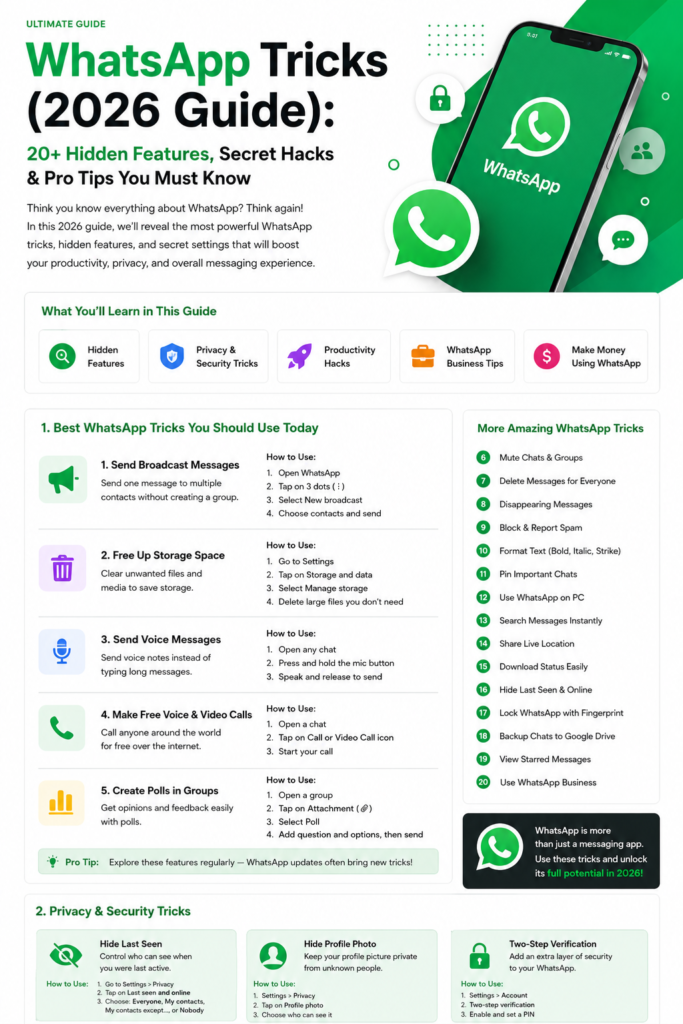
🎯 What You’ll Learn in This Guide
In this step-by-step guide, you’ll learn:
- How to use WhatsApp features properly
- Hidden tricks most users don’t know
- Productivity hacks
- Business use cases
👉 Everything explained in simple steps
🧠 Section 1: Basic Setup (Don’t Skip This)
Before using advanced tricks, you need to know where everything is.
✅ How to Open Settings
- Open WhatsApp
- Tap 3 dots (⋮) in top-right
- Click Settings
👉 Almost all features are inside this panel.
🔥 Section 2: Communication Tricks (Smart Messaging)
📩 Trick 1: Send Broadcast Messages (Mass Messaging)
📌 What is it?
Send one message to multiple people without creating a group
✅ Steps:
- Open WhatsApp
- Tap 3 dots (⋮)
- Click New Broadcast
- Select contacts
- Type message → Send
💡 Pro Tip:
👉 Only those who saved your number will receive it
🎯 Use Case:
- Marketing
- Announcements
- Offers
🎤 Trick 2: Send Voice Messages (Faster Communication)
Typing long messages is slow.
✅ Steps:
- Open chat
- Press & hold mic button 🎤
- Speak
- Release to send
💡 Advanced Tip:
👉 Slide mic up to lock recording (hands-free)
📞 Trick 3: Free Voice & Video Calls
✅ Steps:
- Open chat
- Tap:
- 📞 for voice
- 🎥 for video
💡 Benefit:
👉 Works worldwide using internet
📊 Trick 4: Create Polls in Groups
✅ Steps:
- Open group chat
- Tap 📎 attachment icon
- Click Poll
- Enter question + options
- Send
🎯 Use Case:
- Decisions
- Voting
- Feedback
✍️ Trick 5: Format Text Like a Pro
Make your messages stylish.
✅ Use these formats:
- Bold →
*text* - Italic →
_text_ Strike→~text~
💡 Example:
👉 Important Update
📌 Trick 6: Pin Important Chats
✅ Steps:
- Long press chat
- Tap 📌 Pin icon
💡 Benefit:
👉 Important chats always stay on top
🧹 Section 3: Storage & Performance Tricks
🧹 Trick 7: Clean WhatsApp Storage
Over time, WhatsApp fills your phone with junk.
✅ Steps:
- Settings → Storage and Data
- Tap Manage Storage
- Review large files
- Delete unnecessary media
💡 Result:
👉 Faster phone + more space
📂 Trick 8: Find Large Files Quickly
✅ Steps:
- Settings → Storage & Data
- Manage Storage
- Check “Large Files” section
👉 Delete heavy videos/images
🔒 Section 4: Privacy & Security Tricks
🔐 Trick 9: Enable Disappearing Messages
✅ Steps:
- Open chat
- Tap contact name
- Select Disappearing Messages
- Choose time
💡 Benefit:
👉 Messages auto-delete
🚫 Trick 10: Block Contacts
✅ Steps:
- Open chat
- Tap contact name
- Scroll → Click Block
👉 Stops spam instantly
🔕 Trick 11: Mute Notifications
✅ Steps:
- Open chat
- Tap contact/group name
- Click Mute Notifications
- Choose time
👉 No disturbance
💻 Section 5: Productivity Hacks
💻 Trick 12: Use WhatsApp on PC
✅ Steps:
- Open web.whatsapp.com
- Go to WhatsApp → Linked Devices
- Tap Link a Device
- Scan QR code
💡 Benefit:
👉 Faster typing + multitasking
📤 Trick 13: Message Without Saving Number
✅ Steps:
- Open browser
- Type:
https://wa.me/91XXXXXXXXXX- Open chat
👉 No need to save contact
🔍 Trick 14: Search Messages Instantly
✅ Steps:
- Open chat
- Tap 🔍 search icon
- Type keyword
👉 Find anything instantly
📍 Trick 15: Share Live Location
✅ Steps:
- Open chat
- Tap 📎 attachment
- Click Location
- Select Live Location
👉 Real-time tracking
💡 Section 6: Smart Usage Tips
🚀 Combine Features for Power Use
👉 Example:
- Broadcast + Business = Marketing
- Backup + Privacy = Security
⚠️ Common Mistakes to Avoid
- Not clearing storage
- Ignoring privacy settings
- Sending spam
❓ FAQs
1. What are WhatsApp tricks?
Hidden features that improve usage and productivity.
2. Is WhatsApp free?
Yes, it works on internet.
3. Can I use WhatsApp on PC?
Yes, via WhatsApp Web.
4. How to save storage?
Delete large files from settings.
5. Are messages secure?
Yes, end-to-end encrypted.
🏁 Conclusion
Now you’ve learned:
👉 15 powerful WhatsApp tricks
👉 Step-by-step usage
👉 Productivity hacks
👉 But this is just the beginning…Welcome Back — Now Let’s Unlock the REAL Power of WhatsApp
In Part 1, you learned:
- Messaging tricks
- Privacy settings
- Productivity features
- Storage optimization
But now…
👉 We’re going deeper.
This part focuses on:
- Advanced WhatsApp hacks
- WhatsApp Business features
- Automation tricks
- Money-making methods
- Hidden features most users never discover
💼 Section 1: WhatsApp Business Tricks (Powerful for Earning Money)
Most people still use normal WhatsApp.
Big mistake.
👉 If you run:
- Online business
- Freelancing
- Affiliate marketing
- Local shop
Then WhatsApp Business can seriously boost your growth.
📥 Trick 16: Install WhatsApp Business
✅ Steps:
- Open Play Store / App Store
- Search:
WhatsApp Business - Install app
- Verify number
- Set business name + logo
💡 Why It’s Powerful
You get:
- Auto replies
- Product catalog
- Labels
- Business profile
👉 Makes you look professional instantly.
🤖 Trick 17: Set Auto Replies
This is one of the best features.
When customers message you:
👉 WhatsApp replies automatically.
✅ Steps:
- Open WhatsApp Business
- Tap 3 dots (⋮)
- Go to:
Business Tools - Tap:
Away Message - Turn ON
- Write auto message
💡 Example:
“Thanks for contacting us. We’ll reply shortly.”
🎯 Best For:
- Online stores
- Freelancers
- Agencies
⚡ Trick 18: Use Quick Replies
Instead of typing same message again and again…
👉 Save shortcuts.
✅ Steps:
- Business Tools
- Click Quick Replies
- Tap + Add
- Create shortcut
💡 Example:
Shortcut:
/priceMessage:
“Our latest pricing starts at $49.”
👉 Just type /price
WhatsApp inserts full message automatically.
🏷️ Trick 19: Organize Customers Using Labels
✅ Steps:
- Open customer chat
- Tap 3 dots (⋮)
- Click Label Chat
- Choose label
💡 Example Labels:
- New customer
- Paid
- Pending payment
- VIP customer
👉 Helps manage clients easily.
🛍️ Trick 20: Create Product Catalog
This feature is underrated.
You can showcase:
- Products
- Services
- Pricing
Directly inside WhatsApp.
✅ Steps:
- Open Business Tools
- Tap Catalog
- Add:
- Product image
- Name
- Price
- Description
👉 Customers can browse inside chat.
🔒 Section 2: Advanced Privacy Features
👁️ Trick 21: Hide Last Seen
Don’t want others to know when you were online?
✅ Steps:
- Settings
- Privacy
- Last Seen & Online
- Choose:
- Everyone
- Contacts
- Nobody
👉 More privacy + less disturbance.
📸 Trick 22: Hide Profile Photo
✅ Steps:
- Settings
- Privacy
- Profile Photo
- Select visibility
👉 Control who sees your picture.
🔐 Trick 23: Lock WhatsApp With Fingerprint
✅ Steps:
- Settings
- Privacy
- Fingerprint Lock
- Enable
👉 Adds extra security.
📱 Section 3: Hidden Features Most Users Don’t Know
⭐ Trick 24: Star Important Messages
Save important messages for later.
✅ Steps:
- Long press message
- Tap ⭐ icon
📌 To View:
Settings → Starred Messages
📅 Trick 25: Schedule Messages (Using Apps)
WhatsApp itself doesn’t support scheduling.
But apps like:
- SKEDit
- AutoResponder
allow scheduled messages.
🎯 Use Case:
- Birthday wishes
- Reminders
- Business follow-ups
📷 Trick 26: Send HD Photos
WhatsApp compresses images by default.
✅ Steps:
- Select photo
- Tap HD button
- Send
👉 Better image quality.
🎥 Trick 27: Watch Videos While Chatting
✅ Steps:
- Open video
- Tap Picture-in-Picture mode
👉 Multitasking becomes easy.
💰 Section 4: Make Money Using WhatsApp
Yes… people are earning through WhatsApp.
💼 Method 1: Affiliate Marketing
Promote:
- Amazon products
- Digital products
- Tools
Send affiliate links in:
- Broadcast lists
- Status updates
💡 Example:
Post:
“Best budget earbuds under $50 🎧”
Add affiliate link.
📈 Method 2: WhatsApp Status Marketing
Use status for:
- Offers
- Product demos
- Testimonials
👉 Free marketing traffic.
🧑💻 Method 3: Freelancing Leads
Freelancers use WhatsApp to:
- Talk to clients
- Share portfolios
- Close deals
👉 Makes communication faster.
⚙️ Section 5: WhatsApp Automation Hacks
🤖 Auto Reply Bots
Businesses use bots for:
- FAQs
- Customer support
- Lead generation
📊 CRM Integration
Advanced users connect WhatsApp with:
- CRM tools
- Email systems
- Marketing automation
👉 Complete business workflow.
🚀 Section 6: Productivity Power Tips
🔄 Multi-Device Login
Use same WhatsApp on:
- Phone
- Laptop
- Tablet
✅ Steps:
- Settings
- Linked Devices
- Add device
🧠 Use Archived Chats Smartly
Archive:
- Old chats
- Low priority groups
👉 Cleaner inbox.
⚠️ Common Mistakes to Avoid
❌ Using WhatsApp Without Backup
👉 Risk losing chats.
❌ Sharing Sensitive Data
👉 Be careful with scams.
❌ Too Many Groups
👉 Kills productivity.
❓ FAQs
6. What is WhatsApp Business?
A professional version of WhatsApp for businesses.
7. Can I automate WhatsApp replies?
Yes, using WhatsApp Business tools.
8. Is WhatsApp Business free?
Yes.
9. Can I earn money using WhatsApp?
Yes, through affiliate marketing and services.
10. How to increase privacy on WhatsApp?
Use privacy settings like hidden last seen and fingerprint lock.
🏁 Final Conclusion
WhatsApp is no longer “just a messaging app.”
👉 It’s now:
- A productivity tool
- A business platform
- A marketing system
If you use these tricks correctly:
- You’ll save time
- Improve communication
- Even make money online
🚀 Final Action Steps
Today, try these 3 things:
- Set up WhatsApp Web
- Enable disappearing messages
- Create your first broadcast list
👉 You’ll instantly notice the difference.