Old Android Phone Into a Security Camera: What You Need
Turning an old Android phone into a security camera can give a retired device a useful second life. This old Android phone into a security camera setup is best for basic indoor monitoring, not a replacement for a professional alarm system. That old Android phone in your drawer — the one with a cracked corner and a battery that lasts half a day — already has everything a basic security camera has: a camera, a microphone, Wi-Fi, and a screen. With one free app and about fifteen minutes, it can watch your front door, your baby’s room, or your shop counter, and show you the live feed on the phone you actually use.
You will not get the polish of a camera you buy in a shop, but you will get motion alerts, two-way audio, and night vision through the phone’s own camera — for zero cost, using a device that was otherwise heading for the bin. Below is the quick setup first, then honest answers to the questions people ask before they try it.
How to Turn an Old Android Phone Into a Security Camera
Pick an app first. AlfredCamera is the most popular free option and works well for beginners; other well-known choices include IP Webcam and Manything. Install the same app on both phones — the old one becomes the camera, your current phone becomes the viewer — and sign in with the same account on both. Give the old phone a name like “Front Door” so it is easy to recognise later.
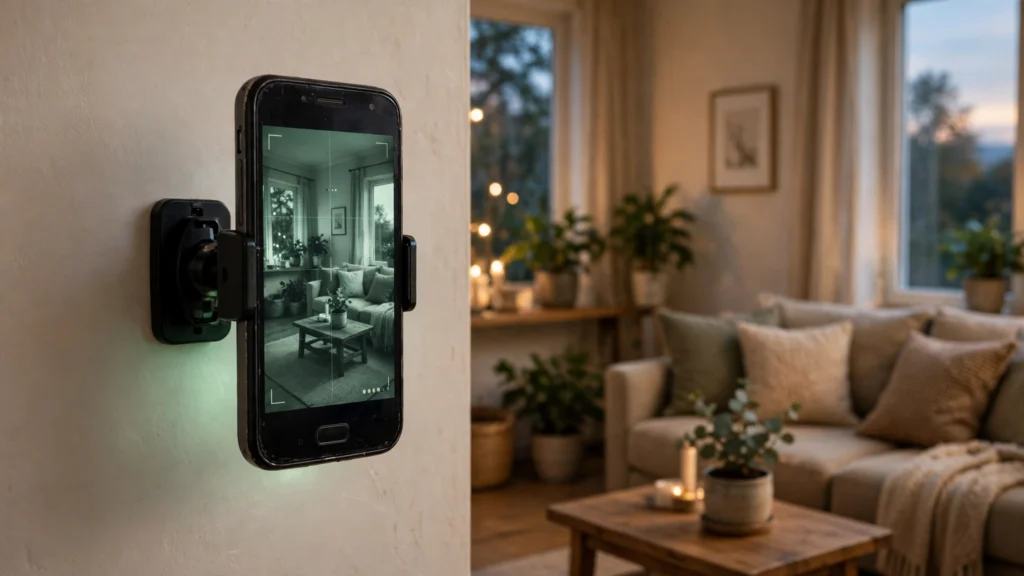
Next, mount the old phone where it can see what matters: near the front door, facing the driveway, or on a shelf in the baby’s room. A cheap phone holder or a small tripod works; a suction mount on a window works too. Plug the charger in and leave it connected — a camera running all day needs constant power. Open the app on your current phone, tap the camera, and you should see the live feed. Walk in front of the old phone once to confirm motion alerts reach your phone, then adjust the angle until the view covers the doorway or area you care about.
One safety step before you finish: remove your personal accounts from the old phone first. Sign out of email and banking apps, and ideally factory-reset it and install only the camera app — our guide to backing up your Android phone covers saving anything worth keeping before you wipe it. A camera phone should hold no personal data at all.
Do I Need Wi-Fi All the Time?
Yes — the old phone needs Wi-Fi to send its feed to your current phone. It does not need a SIM card or a mobile plan: Wi-Fi alone is enough. If your Wi-Fi is unreliable in the spot you want to watch, move the phone closer to the router or add a cheap Wi-Fi extender. Some apps can record locally to the phone when Wi-Fi drops and upload the clips when the connection returns, so check the app’s offline settings if your connection is patchy.
Will It Drain the Battery or Damage the Phone?
Running a camera all day uses a lot of power, which is why the phone stays plugged in. That raises the battery question: keeping a phone on charge permanently can wear an old battery faster. The safer approach is to use a reputable charger and cable, keep the phone on a hard, ventilated surface, and follow the manufacturer’s battery guidance. Avoid improvised charging timers or cheap chargers. If the battery is swollen, damaged, unusually hot, or the phone smells odd, stop using it and have it checked or recycled safely. If the phone gets hot, unplug it and let it cool: a warm phone is normal, a hot one is a sign to check the charger or move the phone out of direct sunlight. If you want to check how healthy that old battery is first, our guide to checking Android battery health shows five quick methods.
Can I Watch the Feed From Anywhere?
Yes. As long as both phones have internet, you can watch from work, from another city, or from holiday. Most camera apps also send a notification the moment they detect movement, so you do not have to stare at the feed all day. Some free plans limit how far back you can rewind or how long clips are stored in the cloud — usually a few days — while paid plans keep recordings longer. For most homes, the free plan’s motion alerts plus live viewing are enough.
Is It Safe? Can Someone Else Watch My Camera?
Any camera connected to the internet carries some risk, and an old phone is no exception — which is why the setup matters. Use a strong, unique password for the camera app account, turn on two-factor authentication if the app offers it, and keep the old phone’s software updated as far as it will go. Never point the camera at a neighbour’s property or a shared space without thinking about privacy laws where you live, and tell people in your home that the camera is there. For general phone safety habits, our guide to Android security settings is a good companion read. AlfredCamera’s official site at alfred.camera explains its encryption and privacy controls in plain language.
What If My Old Phone Is Very Old?
Most camera apps still support Android versions from several years back, so a phone from 2019 or 2020 usually works fine. The main limits on very old phones are a weak camera in low light and a battery that no longer holds a charge — both manageable if the phone stays plugged in and the area is reasonably lit. If the phone cannot install the app at all, it is genuinely too old, and a basic budget camera is the better buy. One bonus of using an old phone: if it is ever lost or stolen, you can still track it with the same tools as any Android — see our guide to finding a lost Android phone.
Do I Need a SIM Card or a Phone Number?
No. A SIM card is not needed, and the old phone does not need an active number. It only needs Wi-Fi and a Google account to install the app. That is also why this project is so cheap: the only things you might spend money on are a mount and a charger cable, both of which you probably already own.
Final Word
An old Android phone will never match a purpose-built camera on night vision or weatherproofing, but for watching a front door, a baby’s room, or a small shop, it is surprisingly capable — and it costs nothing to try. Factory-reset it, install one camera app, plug it in, and test it for a week before deciding whether to keep it. The worst outcome is that you spent fifteen minutes and learned your old phone belongs in the recycling. The best is a free security camera that watches your home while you are away.
Choose the Right Camera App Before You Mount the Phone
The app matters as much as the camera. Before you create an account or place the phone in a permanent position, compare the app’s free features and privacy controls. The best old Android phone into a security camera app for your needs will depend on Android compatibility, recording limits, and privacy settings. Check whether it supports live viewing, motion notifications, two-way audio, recording, and remote access. Some services provide live video for free but reserve cloud history, longer recording, or multiple cameras for paid plans.
Read the app’s current listing and privacy policy. Look at the developer name, the date of the latest update, supported Android versions, permissions, and whether the app explains how video is transmitted and stored. An app may need camera, microphone, and network access for its core function. It should not need unrelated access such as your contacts or SMS messages to act as a camera.
Install the camera and viewer apps only from the official Google Play listing or the developer’s verified website. Avoid modified APK files and unofficial download mirrors. If you want to compare apps, test them on your own network before leaving the camera unattended.
Best Placement: Get a Useful View Without Invading Privacy
Place the phone where it captures the area you genuinely need to monitor. For a front door, angle it toward your own entrance rather than a neighbour’s doorway. For a shop, focus on your own counter or entrance and avoid recording private areas. A stable shelf, tripod, or phone clamp is better than balancing the device on an edge where it could fall.
Think about lighting at different times of day. A bright window behind a person can make the subject appear dark. At night, a phone camera may struggle in a dim room, and digital night-vision features cannot create detail that the camera sensor never captured. Try the view after sunset and adjust a lamp or camera position if needed. Do not point the phone directly at strong lights, and keep it away from heat sources and moisture.
If you are monitoring a shared home or workplace, tell the people who may be recorded and follow the privacy and recording laws that apply in your location. Never hide a camera in a bathroom, changing area, bedroom used by another person, or any place where people reasonably expect privacy. Do not use this setup to secretly monitor someone.
How to Improve Motion Detection and Reduce False Alerts
Motion alerts can be useful, but a camera pointed at a moving curtain, ceiling fan, television, or busy street may send too many notifications. Start by aiming at a fixed entry point and adjusting the app’s motion sensitivity. If the app supports detection zones, select only the part of the image that matters. This can reduce alerts caused by traffic or activity outside your property.
Test the alerts while you are in the same room. Walk through the frame at different distances and speeds, then check whether the viewer phone receives a notification. Repeat the test with the room lights dimmed. If the app offers person detection, check whether that feature is free or requires a subscription; do not assume all motion detection is intelligent person recognition.
Keep the phone stable. A loose mount can move when a door closes or when someone walks nearby, which may trigger repeated motion events. Secure the cable so it cannot pull the phone down, and make sure the lens is clean.
Storage: Live Viewing, Local Recording, or Cloud Clips?
There are three common ways camera apps handle footage. Live viewing streams the current image but may not save anything. Local recording stores clips on the old phone, which uses its available storage and may be lost if the phone is damaged or stolen. Cloud recording sends clips to the provider’s servers, which can make remote playback easier but may have limits, subscription fees, and privacy implications.
Before relying on recordings, check how long clips are retained, whether you can download them, and what happens when storage fills up. If you use local storage, leave enough free space for the app and Android to operate. If you use cloud storage, protect the account with a unique password and two-factor authentication where available. Avoid keeping sensitive footage longer than you need.
A live stream is not the same as a reliable security recording system. If you need evidence-quality footage, continuous recording, or a dependable record during internet outages, compare a purpose-built security camera with a documented recording and backup system.
Power, Heat, and Safe 24/7 Operation
A phone used as a camera may remain active for long periods, which creates more heat than ordinary standby. Heat is affected by screen brightness, video resolution, charging, background apps, sunlight, and the age of the battery. Place the phone in an open area with airflow. Do not cover it with fabric, put it inside a closed box, or leave it on a windowsill in direct sun.
Use a compatible charger from a reputable manufacturer and inspect the cable for damage. If the phone becomes unusually hot, disconnect it and let it cool. Stop using a battery that is swollen, leaking, or physically damaged. Do not puncture or press a swollen battery; arrange safe repair or recycling.
If you want to reduce unnecessary battery wear, check whether your phone supports a charge limit or battery protection feature. The setting is manufacturer-specific and may not exist on older devices. Do not rely on an improvised timer as a substitute for a safe charger and ventilation.
What Happens If Wi-Fi or Power Goes Out?
If the old phone loses Wi-Fi, remote live viewing and notifications may stop. Some apps can continue recording locally, but this depends on the app and the available storage. Test the exact behavior instead of assuming it will work offline. When internet access returns, some services may reconnect automatically; others may need the app reopened.
A power cut stops the camera once its battery runs down. An old battery may last only a short time, especially with the camera and screen active. If uninterrupted monitoring is important, use a purpose-built camera with a suitable backup power option, or a properly designed backup system. A repurposed phone is best treated as a low-cost convenience, not as a guaranteed alarm or emergency system. If you need dependable protection, do not rely on an old Android phone into a security camera as your only security measure.
Set Up a Secure Dedicated Camera Phone
A dedicated camera phone should contain as little personal information as possible. Back up anything you need, sign out of personal accounts, and consider a factory reset before setting it up. Install only the camera app and essential system updates. Use a strong screen lock if the app and setup allow it, and do not leave banking, email, private photos, or work accounts on the device.
Protect the camera-app account with a password that you do not reuse elsewhere. Enable two-factor authentication if available. Review account sessions periodically and remove old devices you no longer use. Keep the operating system and camera app updated for as long as the phone receives security support. If the device no longer receives security updates, do not treat it as a high-security surveillance device.
Old Phone Camera vs a Dedicated Security Camera
A repurposed phone can be a useful way to experiment or watch a low-risk area, but it has limitations. A dedicated camera may offer weather resistance, infrared night vision, motion zones, local storage, better mounting, and a more predictable always-on design. Some models also include backup power or integrate with a home security system.
| Feature | Old Android phone | Dedicated security camera |
|—|—|—|
| Initial cost | Often free if you already own a phone | Usually requires a purchase |
| Setup | App, account, mount, and Wi-Fi | Designed for camera installation |
| Night performance | Depends on the phone camera and lighting | May include infrared night vision |
| Outdoor use | Usually not weatherproof | Some models are weather-rated |
| Long-term operation | Battery and heat need attention | Built for continuous use, model dependent |
| Recording | Depends on app and free-plan limits | Often supports local or cloud options |
| Reliability | Depends on old hardware and software support | Usually more predictable when properly installed |
Choose the old phone when you want a temporary, low-cost view of an indoor area. An old Android phone into a security camera project is a practical reuse idea when the device is still supported and its battery is safe. Choose a purpose-built camera when reliability, outdoor use, night recording, or continuous security coverage matters.
Troubleshooting Common Problems
- Live feed is black: Check camera permission, close other apps using the camera, restart the app, and confirm the lens is not covered.
- Viewer cannot connect: Check Wi-Fi on both phones, confirm they are signed into the correct account, and review the app’s connection instructions.
- Motion alerts do not arrive: Check notification permission, battery optimisation restrictions, and the app’s motion-detection settings.
- Video looks blurry: Clean the lens, stabilise the mount, improve lighting, and check the app’s streaming quality setting.
- Phone overheats: Unplug it, move it away from sunlight, improve airflow, lower screen brightness, and stop using it if the battery appears damaged.
- Recording stops: Check free storage, app subscription limits, background restrictions, and whether the phone has entered a power-saving mode.
Frequently Asked Questions
Can I turn an old Android phone into a security camera for free?
Yes, you can try a free camera app if the phone still supports it. Some features, such as longer cloud recording or multiple cameras, may require a paid plan. You may also need a phone stand and charger.
Does the old phone need a SIM card?
No. A SIM card is not normally required if the phone can connect to Wi-Fi and the camera app supports internet-based viewing.
Can I watch the camera when I am away from home?
Usually, yes, if the camera phone and viewer phone have internet access and the app supports remote viewing. Test remote access before relying on it.
Will it record video all day?
That depends on the app, storage, phone hardware, and plan. Some free apps focus on live viewing and motion clips rather than unlimited continuous recording.
Can I use the phone as an outdoor security camera?
Only if the device is protected from weather, dust, moisture, and extreme temperatures, but most phones are not designed to be permanently installed outdoors. A weather-rated security camera is generally safer for outdoor use.
Can I use an old phone as a baby monitor?
It may provide a supplementary live view, but it should not replace a purpose-built baby monitor or safe-sleep practices. Do not rely on an old phone app for critical infant monitoring, emergency alerts, or medical functions.
Is it legal to record people with an old phone camera?
Rules vary by location and situation. Inform people who may be recorded, respect private spaces, and check local laws before recording shared homes, tenants, employees, visitors, or public areas.
Can someone hack my old phone camera?
Any internet-connected device can face security risks. Use a reputable app, unique password, two-factor authentication, software updates, and minimal personal data on the camera phone.
Will the camera work if the internet goes down?
Remote viewing and notifications usually stop when internet access is unavailable. Some apps may save footage locally, but this is app-specific and should be tested in advance.
Is an old phone better than a cheap CCTV camera?
It is cheaper if you already own the phone and only need basic indoor viewing. A dedicated camera is usually better for reliable recording, outdoor installation, night vision, and continuous operation.
Useful Official Guidance
Before installing a camera app, review Google’s Google Play Protect guidance and the app developer’s privacy documentation. These resources can help you understand app safety and the permissions you are granting.